The Moroccan tariff,
line by line.
Full-text search, the official tree to browse, and one record per code holding the ADII description, import duties, unit, explanatory notes and classification decisions. This is the verification tool.
Over 13,000 tariff lines. Official customs-administration wording.
When you need
the source, not an opinion.
A proposed code is only worth what the tariff line behind it says. This is where you go and read it.
Check a code before you file
The official wording gets held against the product word by word. An exclusion tucked in after a comma — "other than…", "excluding…" — changes the classification on its own, and that is the kind of detail you only catch by reading the whole line.
Find a heading you already know
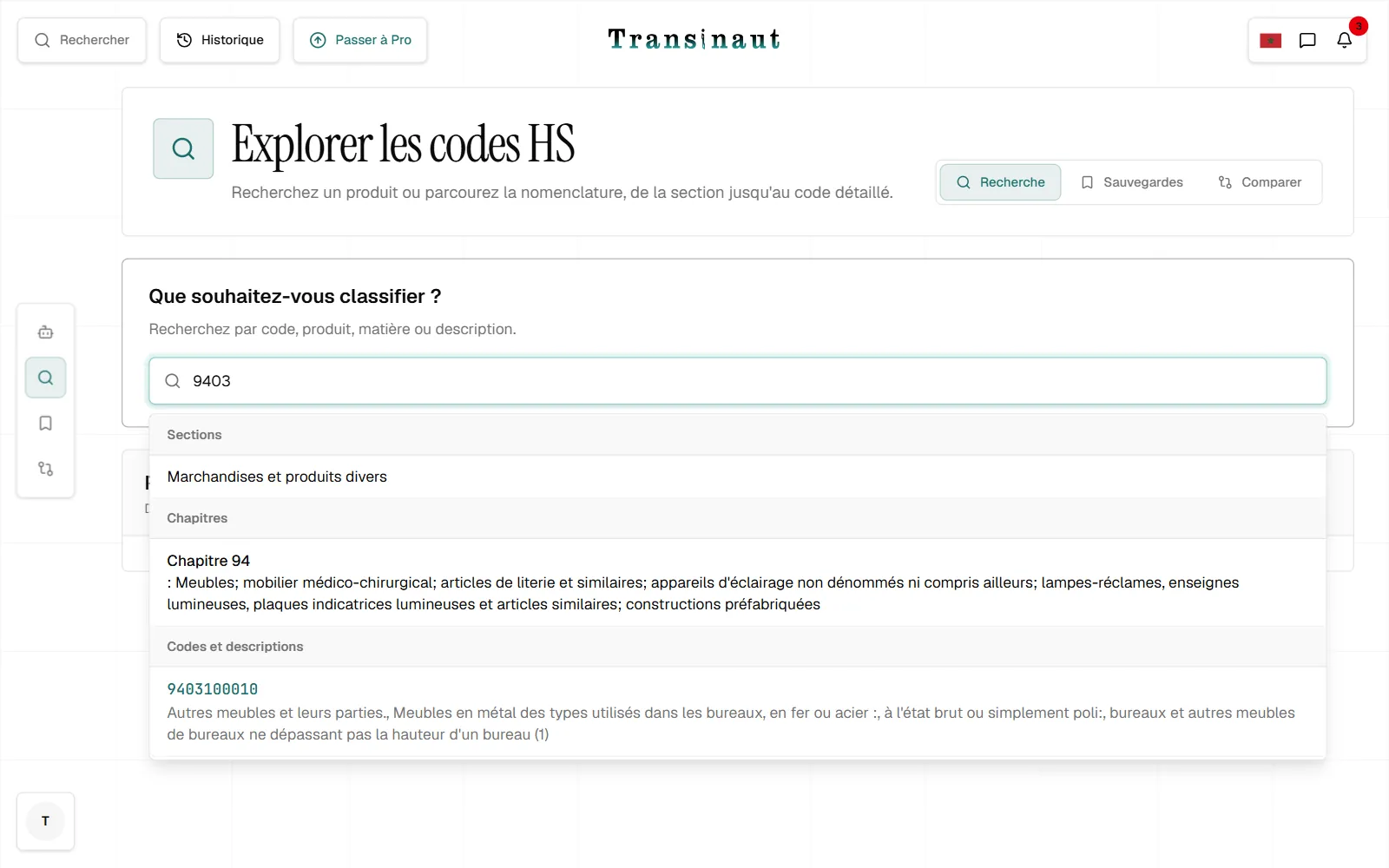
The code is in your head, or on an old file. Type the fragment: `9403` lists the heading and every national subdivision under it, down to the 10 digits specific to Morocco.
Walk a whole chapter
When you do not know the official vocabulary, browsing beats keywords. A section opens into chapters, a chapter into codes, and the structure of the tariff explains itself.
Never classify the same product twice
A saved code with a note — the product reference, the client, the reason for the choice — is a reproducible decision six months later rather than a vague memory. Categories keep the library sorted by family or by file.
Search, drill down,
read the record.
- 01
One bar for codes and for words
From 3 characters, on a code fragment as readily as on words from the description. Up to 50 results, grouped into sections, chapters and tariff lines.
- 02
Drill down the tree
Section, then chapter, then codes. Two digits for the chapter, four for the heading, six for the international subheading, eight and ten for the Moroccan subdivisions.
- 03
Read the record and act
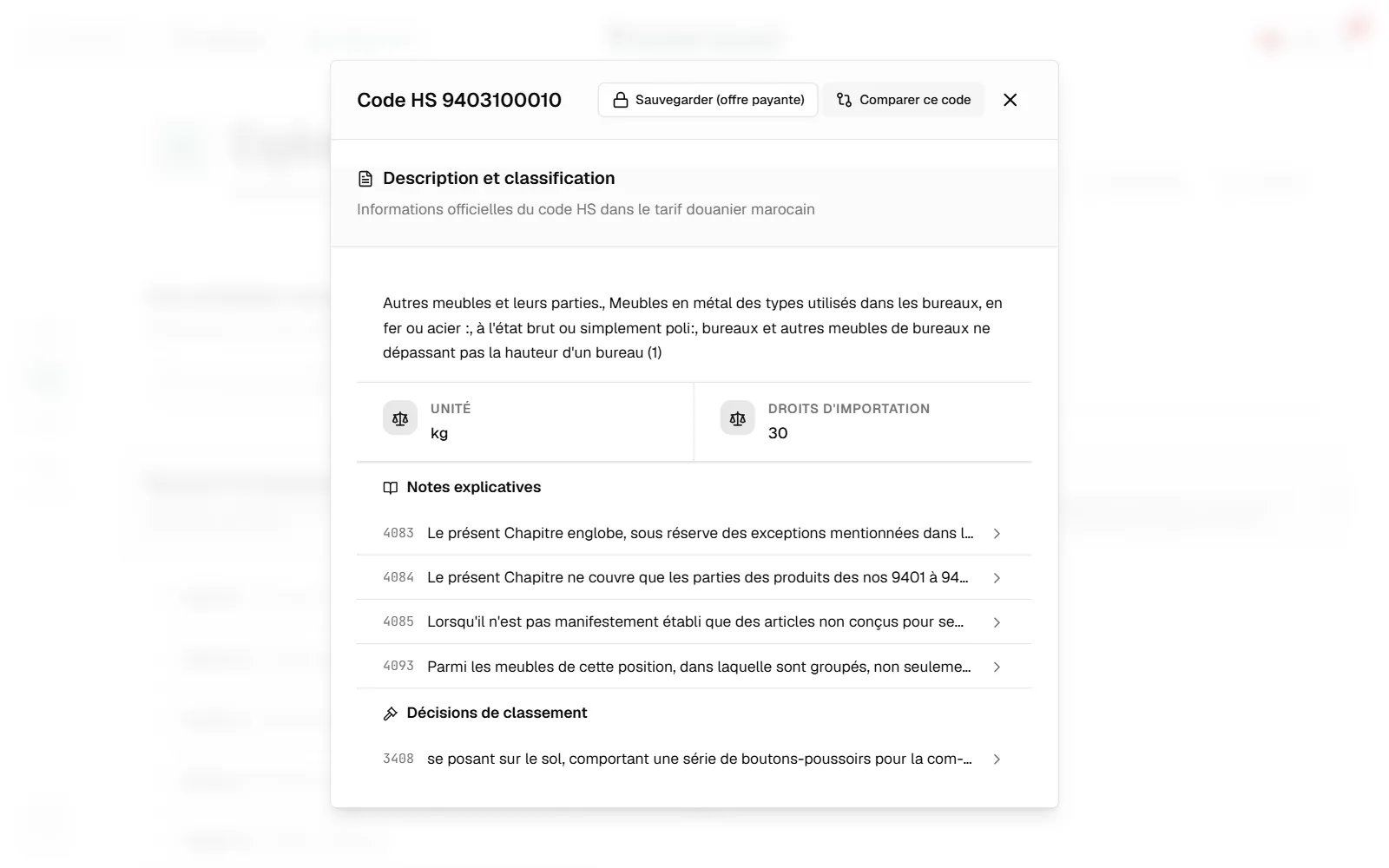
Official description, duties, unit, notes, decisions. From the record: compare the code against a rival, save it with a note, or open it in the assistant to talk through its limits.
The whole tariff,
and a way through it.
Codes and descriptions in one bar
A code fragment or words from the description: search does not ask you to choose. Looking up the material or the function beats the trade name every time.
Browse by section and chapter
The official tree reads top to bottom, with uncovered chapters marked as such. More reliable than a keyword when the nomenclature's vocabulary is unfamiliar.
Saved codes, with the why
Every entry carries a free-text note and sits in a category you name and colour. The filter searches codes, descriptions and your own notes at once.
The full record, not an extract
Complete official description, import duty rate, unit of account, references to the explanatory notes, and the classification decisions attached to the code.
Search gives you the tariff line exactly as published. Three things it does not claim to do.
- It does not compute your duties. The rate shown is for an order of magnitude; customs value, taxes and ancillary costs are not calculated here.
- It does not translate the official wording. It stays in French even when the interface is in English or Arabic: that is the version that governs.
- It covers Morocco only. A foreign 8- or 10-digit code has no direct equivalent in the Moroccan tariff, and the reverse holds too.
Ask,
or settle it.
Open the tariff and look up a code.
Search and browsing are available from the Free plan. The saved-codes library starts at Starter.
Free plan, forever · search and browsing included